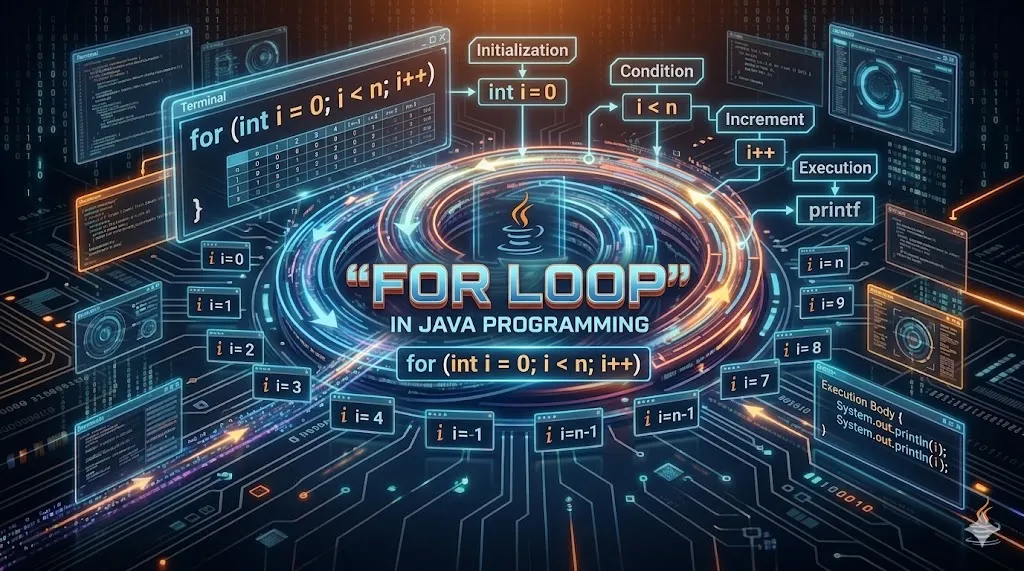
For Loop in Java
The for loop is the most popular loop in Java. It combines initialization, condition and update into a single line, making code compact and readable. Use it whenever the number of iterations is known in advance.
Key Features
Counter Control
Built-in counter variable simplifies arithmetic loops.
Compact Syntax
Init, condition and update in a single line.
Nested Loops
Build patterns, multiplication tables and 2D traversal easily.
For-Each
Enhanced version for arrays and collections.
Custom Step
Use i+=2 or any expression for non-1 increments.
Reverse Loop
Easy reverse iteration with i--.
Syntax
- Syntax: for (init; condition; update) { body }
- init runs once at the start.
- condition checked before each iteration.
- update runs after each iteration.
For Loop Patterns
| Pattern | Syntax | Use | Example |
|---|---|---|---|
| Counter Up | for(i=0;i<n;i++) | Forward iter | 1 to N |
| Counter Down | for(i=n;i>0;i--) | Reverse | N to 1 |
| Step Skip | for(i=0;i<n;i+=2) | Even / Odd | 0,2,4,... |
| Infinite | for(;;) | Server loop | until break |
| For-Each | for(int x:arr) | Array iter | all items |
Detailed Explanation & First Example
Let's start with a hands-on example. The program below shows the core idea behind For Loop in just a few lines of Java. Read it line by line and observe how Java executes each statement in order.
class Main
{
    public static void main(String args[])
    {
        for (int i = 1; i <= 10; i++)
        {
            System.out.println(i);
        }
    }
}
2
3
4
5
6
7
8
9
10
Examples — Beginner to Advanced
The following examples progress from simple to more practical patterns. Try each in your IDE, change the inputs and observe the output. This is the fastest way to internalize the concept.
class Main
{
    public static void main(String args[])
    {
        int sum = 0;

        for (int i = 2; i <= 20; i += 2)
            sum += i;

        System.out.println("Sum = " + sum);
    }
}
class Main
{
    public static void main(String args[])
    {
        int n = 7;

        for (int i = 1; i <= 10; i++)
            System.out.println(n + " x " + i + " = " + (n * i));
    }
}
class Main
{
    public static void main(String args[])
    {
        for (int i = 5; i >= 1; i--)
            System.out.println(i);
    }
}
4
3
2
1
class Main
{
    public static void main(String args[])
    {
        for (int i = 1; i <= 5; i++)
        {
            for (int j = 1; j <= i; j++)
                System.out.print("* ");
            System.out.println();
        }
    }
}
* *
* * *
* * * *
* * * * *
class Main
{
    public static void main(String args[])
    {
        int arr[] = {12, 25, 7, 38, 19};

        for (int x : arr)
            System.out.println(x);
    }
}
25
7
38
19
Notes & Tips
- All three parts of the for loop are optional —
for(;;)is a valid infinite loop. - Declare the loop variable inside the for() to limit its scope.
- Use long instead of int if your counter may exceed 2.1 billion.
- Avoid modifying the loop variable inside the body — it harms readability.
- Use the for-each loop whenever the index is not needed.
Real-World Use Cases
Pattern Printing
Stars, numbers, pyramids with nested for loops.
Math Sequences
Factorial, Fibonacci, primes computed with for loops.
Reports
Iterating over rows in a results table or sales list.
Image Pixels
Traversing a 2D pixel grid with nested for loops.
Practice Questions
Reading is not enough — practice solidifies knowledge. Try every question below in your own editor before peeking at any solution.
- Q1. Print all multiples of 5 between 1 and 100.
- Q2. Compute the factorial of 7 using a for loop.
- Q3. Print a pyramid star pattern of height 6.
- Q4. Find sum of digits of a number using a for loop.
- Q5. Print all prime numbers between 1 and 50.
Interview Questions
These are the most common questions asked in Java interviews on this topic. Memorize the concept, not just the answer — interviewers often follow up with edge cases.
Yes —
for(;;) produces an infinite loop that must be exited via break or return.
For-each iterates over each element without an index, ideal for arrays/collections; the classic for gives you the index.
Yes — separate them with commas:
for(int i=0,j=10; i<j; i++,j--).
It limits the variable's scope to the loop, preventing accidental misuse outside it.
An optimization where the compiler executes multiple iterations per cycle to reduce overhead — usually automatic in the JVM.
FAQ
No, performance is the same — choose based on clarity and intent.
Yes — end with a semicolon, e.g.,
for(int i=0;i<n;i++);. Useful for timing or empty waits.
Yes but be careful with float precision; use
BigDecimal for exact decimals.
Use the
break statement.
Time complexity multiplies — two nested loops are O(n²). Optimize algorithms before micro-optimizing loop syntax.
Common Mistakes to Avoid
Even experienced developers slip on the same pitfalls. Watch out for these classic mistakes while working with For Loop in Java:
- Forgetting the semicolon
;at the end of statements while using For Loop. - Mixing up similar method names — read Java docs before using new APIs related to For Loop.
- Ignoring compiler warnings — they often hint at bugs that will appear later in production.
- Hard-coding values that should come from configuration files or environment variables.
- Not handling edge cases: empty inputs, very large inputs, negative numbers and null references.
- Skipping unit tests — small tests prevent big regressions, especially around control flow.
At-a-Glance
Best Practices
Follow Conventions
Use camelCase for variables, PascalCase for classes, UPPER_SNAKE for constants.
Write Tests
Cover happy path and edge cases with JUnit before shipping changes to production.
Keep Methods Short
A method should do one thing and fit on a single screen. Refactor when it grows.
Validate Inputs
Never trust user input. Validate at the boundary, fail fast and log meaningfully.
Comment the Why
Comments should explain why a decision was made — not what the code does line by line.
Refactor Often
Small frequent refactors are cheap and safe; big rewrites are risky and expensive.
Pro Tips
Quick Reference
| Keyword / Concept | Meaning | Used For | Java Since |
|---|---|---|---|
| For Loop | For Loop concept | Core Java | 1.0 |
| class | Blueprint of objects | OOP | 1.0 |
| static | Class-level member | Utilities | 1.0 |
| final | Constant / no override | Immutability | 1.0 |
| public | Accessible everywhere | API exposure | 1.0 |
| private | Class-only access | Encapsulation | 1.0 |
Related Topics
java.util, java.lang and java.io.
Summary
The Java for loop packs initialization, condition and update into one line. Use it for counters, pattern printing, nested traversal, and any task with a known number of iterations. The enhanced for-each form gives cleaner iteration over arrays and collections.