CSS Text
CSS Text properties control everything related to the appearance of text — color, alignment, decoration, transformation, spacing, indentation, and shadow. Mastering text properties is essential for clean and accessible typography.
CSS Text Properties Overview
color
Sets the text color.
text-align
Aligns text — left, right, center, justify.
text-decoration
Underline, overline, line-through, none.
text-transform
Uppercase, lowercase, capitalize.
letter-spacing
Spacing between letters.
line-height
Vertical spacing between lines.
text-indent
Indents the first line of a paragraph.
text-shadow
Adds shadow behind the text.
Text Property Syntax
p {
    color: #333;
    text-align: justify;
    text-decoration: underline;
    text-transform: capitalize;
    letter-spacing: 1px;
    line-height: 1.6;
    text-indent: 30px;
    text-shadow: 1px 1px 2px #aaa;
}

Introduction
CSS text decoration properties allow developers to style text using underline, overline, line-through, color, thickness, and decorative styles like solid, double, dashed, and wavy.
Text Decoration Example 1
This example demonstrates different text decoration types like underline, overline, and line-through.
<html>

<head>

<style>

h1{
    text-decoration:overline;
}

h2{
    text-decoration:line-through;
}

h3{
    text-decoration:underline;
}

h4{
    text-decoration:
    underline overline;
}

</style>

</head>

<body>

<h1>PBA INSTITUTE</h1>
<h2>PBA INSTITUTE</h2>
<h3>PBA INSTITUTE</h3>
<h4>PBA INSTITUTE</h4>

</body>
</html>
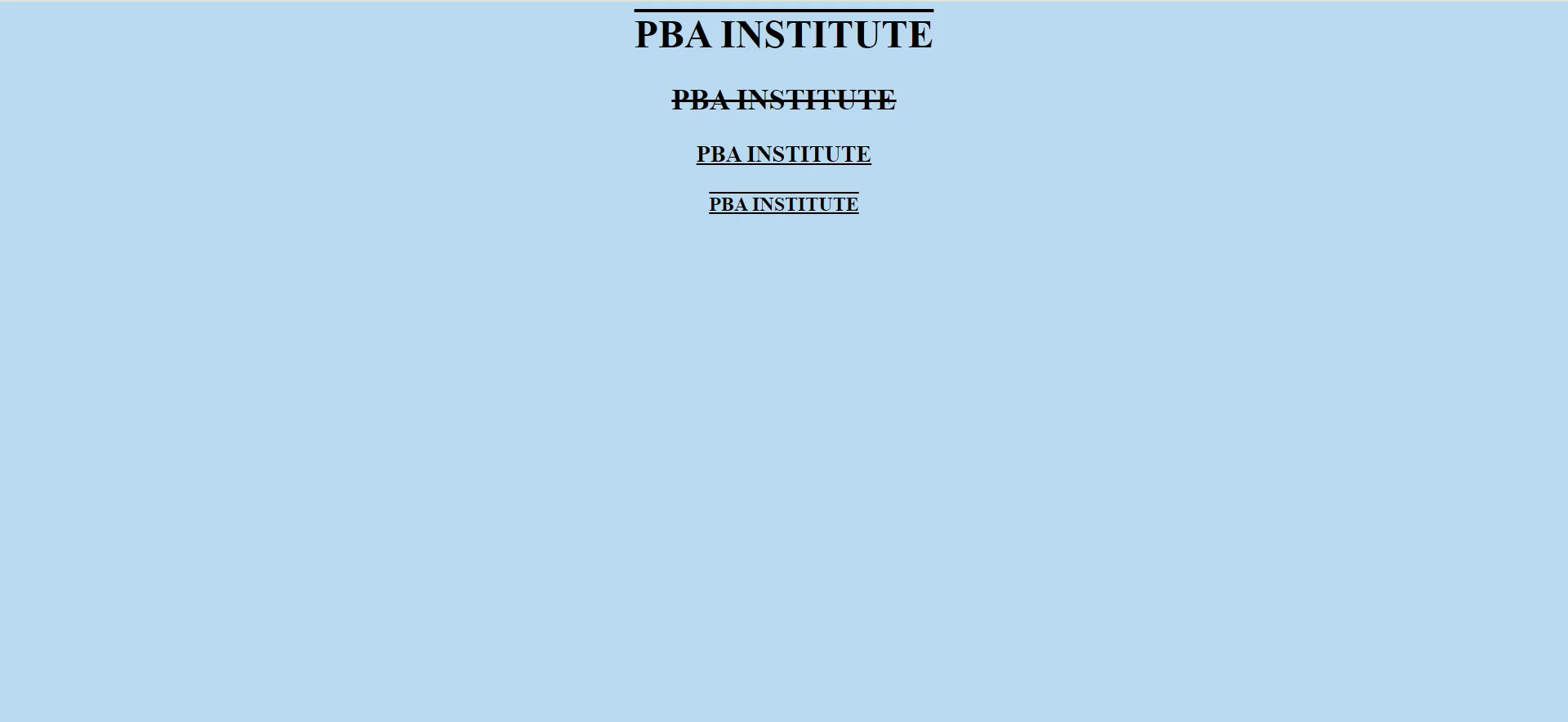
- overline: Adds a line above the text.
- underline: Adds a line below the text.
- line-through: Adds a strike-through line.
Text Decoration Style Example
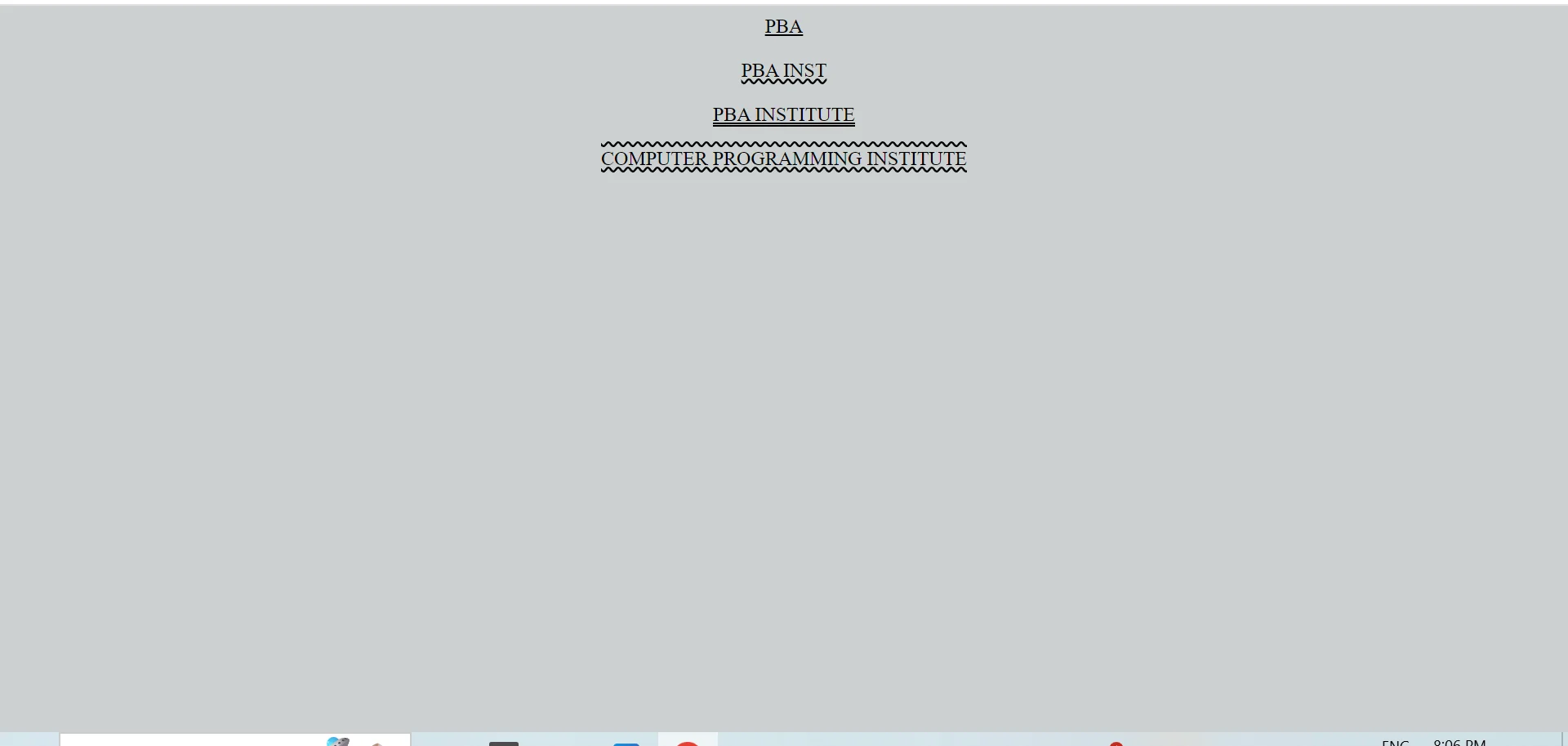
This example demonstrates decoration styles like solid, wavy, and double underline effects.
<html>

<head>

<style>

div.a{
    text-decoration-line:
    underline;

    text-decoration-style:
    solid;
}

div.b{
    text-decoration-line:
    underline;

    text-decoration-style:
    wavy;
}

div.c{
    text-decoration-line:
    underline;

    text-decoration-style:
    double;
}

div.d{
    text-decoration-line:
    overline underline;

    text-decoration-style:
    wavy;
}

</style>

</head>

<body>

<div class="a">PBA</div>

<div class="b">
PBA INST
</div>

<div class="c">
PBA INSTITUTE
</div>

<div class="d">
COMPUTER PROGRAMMING
INSTITUTE
</div>

</body>
</html>
Text Decoration Reference
| Property | Description |
|---|---|
| text-decoration | Shorthand decoration property |
| text-decoration-line | Defines underline or overline |
| text-decoration-style | Sets solid, double, or wavy style |
| text-decoration-color | Changes decoration color |
| text-decoration-thickness | Controls line thickness |
Important Notes
- Underline is commonly used for links.
- Wavy decorations create stylish effects.
- Double lines improve emphasis.
- Text decoration improves readability and design appearance.
Conclusion
CSS text decoration properties help create visually attractive typography using underline, overline, line-through, and modern decorative styles.
Text Styling Example
<!DOCTYPE html>
<html>
<head>
    <title>CSS Text</title>
    <style>
        body { font-family: Arial; padding: 30px; }
        h1 {
            color: #1a73e8;
            text-align: center;
            text-transform: uppercase;
            text-shadow: 2px 2px 4px #ccc;
            letter-spacing: 2px;
        }
        p {
            color: #444;
            text-align: justify;
            line-height: 1.7;
            text-indent: 40px;
        }
        .underline { text-decoration: underline; }
        .strike    { text-decoration: line-through; color: red; }
    </style>
</head>
<body>
    <h1>PBA Institute</h1>
    <p>CSS gives full control over text — color, alignment, decoration, transformation, and spacing.</p>
    <p class="underline">This text is underlined.</p>
    <p class="strike">This text has a strikethrough.</p>
</body>
</html>
Code Explanation
color: Changes text color.text-align: center: Centers heading horizontally.text-transform: uppercase: Converts text to uppercase.letter-spacing: Adds space between letters.text-shadow: Adds soft shadow behind the heading.line-height: 1.7: Improves readability with comfortable spacing.
Text Property Reference
| Property | Values | Purpose |
|---|---|---|
color |
any color | Text color |
text-align |
left, right, center, justify | Horizontal alignment |
text-decoration |
underline, overline, line-through, none | Text lines |
text-transform |
uppercase, lowercase, capitalize | Case conversion |
letter-spacing |
px, em, normal | Space between letters |
word-spacing |
px, em, normal | Space between words |
line-height |
number / px / % | Line spacing |
text-indent |
px, em | First line indent |
text-shadow |
x y blur color | Shadow behind text |
Text Property Categories
Alignment
Control horizontal alignment with text-align.
Decoration
Underline, line-through, overline using text-decoration.
Spacing
Use line-height, letter-spacing, word-spacing for readability.
Common Values
Important Notes
- Use line-height for readability: 1.4 - 1.7 works best for body text.
- Avoid all-uppercase paragraphs: They reduce readability — use sparingly.
- Use text-shadow lightly: Heavy shadows hurt accessibility and readability.
- Color contrast: Ensure WCAG-compliant contrast between text and background.
Real-World Use Cases
Headings
Use uppercase, letter-spacing, and shadow for impact.
Articles
Justify and indent paragraphs for editorial style.
Links
Underline links so they stand out.
Practice Questions
- Center align an h1 heading in red color.
- Apply uppercase transformation to a navigation menu.
- Add a 2px shadow to a heading.
- Increase letter-spacing of a button label to 2px.
- Justify a paragraph and indent its first line by 30px.
Frequently Asked Questions
- How do I underline text in CSS: Use
text-decoration: underline. - How to remove underline from a link: Use
text-decoration: noneon the anchor tag. - How to add shadow to text: Use
text-shadow: x y blur color. - What is the difference between letter-spacing and word-spacing: letter-spacing adjusts spacing between characters; word-spacing adjusts spacing between words.
Conclusion
CSS text properties give you precise control over typography. From alignment and decoration to shadow and spacing, well-styled text creates a professional reading experience and improves accessibility.
CSS All Topics
Continue Learning
Previous
Go to CSS Table Chapter